
Talk to our team: +90 212 706 6483

Health & Wellness

Dentist Appointment Software manage your clinic from one panel

Dentist and chair calendar, online check-up booking, digital consent, treatment payment plans and appointment reminders -- bring your clinic's appointments, consents and payments together in one panel.

No credit card required
2-minute setup
KVKK compliant

Last updated:

Real Industry Challenges

Do these daily struggles sound familiar?

The most common operational bottlenecks in dental clinics, compiled from real conversations.

The next visit of a multi-session treatment gets lost

When was the second root canal session? Which day is the implant check-up? Multi-session treatments and orthodontic check-ups get lost in the same calendar.

Dentist and chair schedules live in different places

Which dentist is busy at what time, which chair is free? In a multi-dentist clinic, two patients can end up booked in the same chair at the same time.

Consent forms sit in a binder

Was the consent signed before treatment? Paper forms are buried in binders, and a treatment that started unsigned is noticed too late.

Installments are tracked from memory

Has the implant patient paid this month's installment? Due dates live in a notebook or in someone's head, and a late payment is spotted late.

Phone traffic wears out the front desk

Check-up appointments are taken by phone. During peak hours, both the front desk and patients struggle.

Patients leave without a check-up appointment

The six-month check-up is discussed but never written into the calendar; months later neither the patient nor the clinic remembers it.

The Piyzi Solution

All these problems solved with Piyzi

A digital solution designed around the daily operations of dental clinics.

Dentist and Chair Calendar

Define your chairs as resources and view the calendar by dentist or by chair. Piyzi warns you when you book a second appointment in an occupied chair or for the same dentist at the same time.

Online Check-up Booking

On a page under your clinic's name, the patient picks a dentist and a time and verifies with a text message code. You hide prices on the page and keep only check-ups open.

Digital Consent

A dental treatment informed consent template comes ready; the patient reads the form on their phone, verifies with a code and signs. If the rule is mandatory, the sales card cannot be completed without the signed consent.

Treatment Package and Payment Plan

Define surgery, check-ups and the prosthetic phase in one package; the remaining count of each phase is shown separately. Split the treatment fee into installments and keep every due date in the receivables list.

Appointment and Payment Reminders

A text message, WhatsApp message or app notification one day before the appointment, and a payment reminder three days before each due date. The ready-made messages carry only appointment or payment information.

Patient Card and Internal Notes

Appointments, total paid and outstanding balance, packages and consent forms on one card. Patients never see the team's notes anywhere.

Industry-Specific Features

Purpose-built for dentists

Modules tailored to the multi-visit treatment processes of dental practice.

Dentist and Chair Calendar

View the calendar in dentist or chair columns and get a warning on conflicts.

Blocking a Dentist's Hours

Block congress or leave hours; no online bookings land in them.

Recurring Appointments

Set up an orthodontic check-up every four weeks once; the series is created up to the end you choose (one year at most).

Online Booking Page

Under your clinic's name, with options to hide prices and remove services from the page.

Dental Treatment Consent

Ready template, approval with a code and signature on the phone, a mandatory rule and the expiry date on the card.

Treatment Package and Installments

Multi-phase treatment package; the fee is split into 1 to 24 installments and every due date is tracked in receivables.

WhatsApp and Instagram Inbox

Messages in one inbox; if the patient is registered their card opens alongside, and you assign the conversation to a dentist.

POS, Sales Card and Dentist Commission

Treatments, products and payments on one sales card; revenue and commission report per dentist.

Platform Preview

Explore your dental clinic dashboard live

See how a dental clinic uses Piyzi day to day.

Takvim

4 Nisan 2026 Cumartesi

Canlı
Z

Zeki

Sahip

A

Akif

Uzman

M

Mevlüt

Uzman

09:00

10:00

11:00

12:00

13:00

Ayşe K.

Saç Bakımı

Fatma S.

Manikür

Mehmet D.

Sakal + Saç

Ali R.

Saç Kesimi

Zeynep A.

Cilt Bakımı

Can Y.

Boya

Elif T.

Kesim

7

Randevu

₺2.450

Beklenen ciro

%85

Doluluk

Randevu Takvimi

Hekim veya uzman bazlı seans planlama.

AY

Ayşe Yılmaz

Premium üye · 14 ay

Aktif

Vücut Ölçüm Takibi

-2.4 kg

Kilo

64.2 kg

Yağ Oranı

%22.4

Kas Kütlesi

28.1 kg

Aktif Paketler

10 Seans Cilt Bakımı

7/10

Aylık Üyelik

18/30 gün

5 Seans Masaj

2/5

Sonraki seans: 8 Nisan Çar, 14:30

Hasta Takip Paneli

Vücut ölçümleri, paket kullanımı ve seans geçmişi tek ekranda.

Araç Bakım Formu

#2026-0148 · Onaylandı

Tamam

Müşteri

Ahmet Demir

0532 *** 48 72

Plaka

34 ABC 1234

BMW 320i · 2021

Yapılan İşlemler

Motor yağı kontrolü

✓

Fren balata değişimi

✓

Akü durum testi

✓

Lastik diş derinliği

Müşteri Onayı

5 Nis 2026 · 14:32

Ahmet Demir

Dijital imza doğrulandı

Dijital Hasta Formu

Kabul, onam ve bakım formları dijital imzayla.

Tangible Benefits

What your clinic gains with Piyzi

What changes in your dental clinic's daily work with Piyzi.

  • The next session is in the calendar

    The dates of multi-session treatments and orthodontic check-ups are in the calendar; 'when was the second session?' is answered on screen.

  • Consent is signed before treatment

    With the mandatory rule on, an unsigned sales card cannot be completed; the form's expiry date is shown on the patient card.

  • Installments are not forgotten

    Every due date is in the receivables list; the patient gets a reminder three days before, and an overdue payment shows as overdue.

  • The check-up is booked at checkout

    You write the six-month check-up into the calendar as the patient leaves; a reminder goes out one day before the appointment.

  • Chair conflicts are caught

    Piyzi warns you when you book a second appointment in an occupied chair or for the same dentist at the same time.

  • Check-ups are booked without a phone call

    The patient picks a dentist and a time on your page; the front desk is less tied to the phone.

  • Revenue and commission per dentist are clear

    The staff report shows revenue per dentist; the salary and commission tool calculates the period's commission.

How It Works

For dental clinics, setup takes 2 minutes

No complex installation. Create your account and add your first patient the same day.

Create your account, define services and chairs

Enter services like exams, fillings, root canals, implants and orthodontics with their durations; add your chairs as resources.

Import your patient list

Import your list from an Excel or CSV file, or have our team import it free of charge during setup; no messages go to patients during the import.

Set up consent and reminders

Review the dental treatment consent template with your dentist; pick and install the appointment and payment reminders from Ready-made Automations.

Share your check-up booking page

Hide prices, keep only check-ups open and add your page's link to your website.

Who Uses Piyzi?

How Piyzi works in the real world

How dental clinics with different ways of working use Piyzi.

Private Dental Practices

A solo-dentist practice runs appointments, consent, installments and reminders from one panel; the dentist checks the day's appointments and the patient card in the staff app.

Multi-Dentist Clinics

With the dentist and chair calendar, blocked hours and the revenue and commission report per dentist, the team works to the same routine.

Orthodontic Clinics

Check-ups every four weeks are set up as recurring appointments, the treatment fee is split into installments and due dates are tracked in receivables.

Implant and Prosthetics Clinics

Surgery, check-ups and the prosthetic phase are tracked in one treatment package; consent is signed on the patient's phone before treatment.

Running a dental clinic is no longer a job for paper ledgers

A day at a dental clinic follows a steady rhythm, but inside that rhythm lie dozens of details: exams, fillings, root canals, implant check-ups, orthodontic sessions and back-to-back check-up appointments. When was the second root canal session? Has the implant patient paid this month's installment, and was the consent form signed? When appointments are in a ledger, payments in someone's head and forms in a binder, what wears a dentist out is not the filling but the follow-up. Piyzi dentist appointment software brings that follow-up into one panel.

The relationship with a dental patient spans years: a filling patient comes back for a check-up, an orthodontic patient books regular appointments for months, an implant patient goes through a multi-phase process. Diagnosis and treatment records stay in your clinic's health information management system; Piyzi brings the appointment, consent and payment side of that journey together on one patient card. The patient books a check-up on your page, signs the consent before treatment, attends the sessions, pays according to the plan and books the next check-up on the way out.

Dental appointment software or patient tracking software?

When dentists look for software, they find two kinds of products: clinical patient tracking software, where diagnoses, treatment plans and X-rays are recorded, and business software that runs appointments, payments and communication. Piyzi belongs to the second group; knowing up front what it does and does not do makes the right choice easier:

  • What Piyzi has: Dentist and chair calendar, online check-up booking, digital consent, multi-phase treatment packages and installments, a single sales card and receivables, appointment and payment reminders, a WhatsApp and Instagram inbox, and apps for the dentist and the patient.
  • What Piyzi does not have: A dental chart, an X-ray viewer, a clinical treatment plan module, or an e-Nabız or MEDULA connection. Your diagnosis and treatment records stay in your clinic's health information management system.

This split makes it easy to use the two side by side: the dentist keeps clinical records in their own system, and appointments, consents and payments run in Piyzi.

Why do dentists need specialized software?

General-purpose scheduling tools record a single appointment; a dental clinic needs linked appointments, chairs and payments. A root canal takes several sessions, an implant treatment stretches over months as surgery, check-ups and a prosthetic phase, and an orthodontic patient comes every four weeks. In Piyzi you set up the orthodontic check-up once; the series is created automatically up to the end you choose (one year at most). You define the implant treatment as one package; the remaining count of each phase is shown separately, and every session completed is deducted from the package on the sales card.

The second challenge in a multi-dentist clinic is the chairs. In Piyzi you define your chairs as resources and view the calendar by dentist or by chair. When you try to book a second appointment in an occupied chair or for the same dentist at the same time, Piyzi warns you; if you still want to save, the decision is yours. You block a dentist's congress or leave hours with Time Block; no online bookings land in them.

The financial side is distinctive too: treatment fees are often paid in installments. When you sell a package, you split the fee into 1 to 24 installments; installments fall due one month apart, every due date sits in the Receivables list, and the patient sees outstanding payments in their own app.

Core value Piyzi delivers to dentists

The core features that make an immediate difference in your clinic's daily work:

  • Dentist and Chair Calendar: View the calendar by dentist or by chair; get a warning on conflicts and keep online bookings out of a dentist's blocked hours.
  • Online Booking Page: Opens under your clinic's name; the patient picks a dentist and a time, verifies with a text message code, and a patient record is created automatically. You hide prices, remove procedures such as implants or root canals from the page and keep only check-ups open.
  • Digital Consent: A dental treatment informed consent template comes ready; the patient reads the form on their phone, verifies with a code and signs.
  • Treatment Package and Installments: Surgery, check-ups and the prosthetic phase in one package; the fee is split into installments and due dates are tracked in receivables.
  • POS and Sales Card: Treatments performed, the session deducted from the package, oral care products sold and payments on one sales card; the remaining amount is recorded as a receivable.
  • WhatsApp and SMS Reminders: A reminder one day before the appointment and three days before each due date; you connect your SMS and WhatsApp accounts from Pi-Store.
  • Dentist and Patient Apps: The dentist checks the day's appointments, the patient card, notes and outstanding balance on the phone; the patient sees their appointments, treatment package, payments and notifications on their own phone and books new appointments there.

These features work together: the patient books a check-up on your page, signs the consent before treatment, the treatment package is split into installments, every session is deducted from the package on the sales card, and the check-up is written into the calendar as the patient leaves.
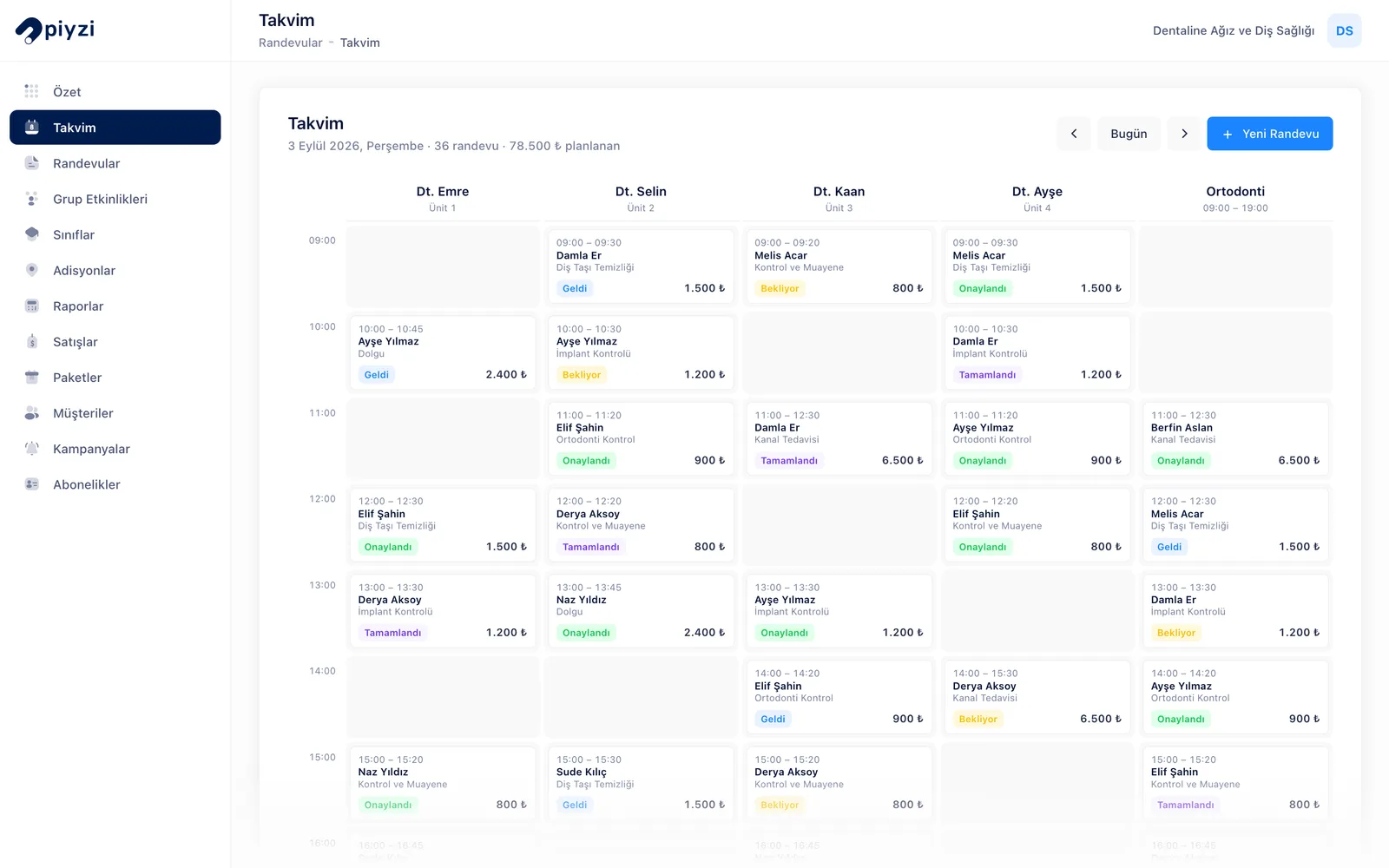
Daily appointment calendar for a dental clinic in Piyzi: one column per team member, statuses and amounts
The daily calendar: a column per team member, with each appointment's status and amount.
  1. You turn on the Digital Consent Forms module in Pi-Store and add the "Dental Treatment Informed Consent Form" from Ready-made Templates; you review the text with your dentist and approve it.
  2. On the Requirement tab you set the rule to Mandatory and choose the treatments that need consent (e.g. root canal, implant surgery). The template comes with a validity of 180 days.
  3. You press Send Link on the patient's card; the patient reads the form on their own phone, verifies with a code sent to their registered number and signs. The signed document is stored as a PDF on the card, and the expiry date appears on its row.
  4. When you sell the implant treatment as a package, you split the fee with Split into Instalments; if the first payment is today it is recorded as a payment, and the remaining installments are recorded as receivables due one month apart.
  5. Each session's treatment is deducted from the package on the sales card; the remaining amount sits in the Receivables list with its due date.

Good to know: code verification and the signing link are sent through your clinic's own SMS account (Verimor, connected from Pi-Store). Ready templates cannot be signed for a patient under 18 whose date of birth is recorded; for child patients you create your own template stating that a parent or guardian signs. When you link a child patient without a phone to a parent, appointment and payment reminders go to the parent's phone. The consent module is not a qualified electronic signature under Turkish Law No. 5070.

How Piyzi transforms your daily workflow

When you open Piyzi in the morning, you see the day's appointments by dentist or by chair; check-ups booked online are already in the calendar. When the first patient arrives, you open their card and see past appointments, the sessions left in their package, the outstanding balance and the consent forms they have signed. The team's notes sit on the card with a topic and a date; the patient never sees them anywhere.

Is the consent signed before the implant surgery? If the rule is mandatory, a red banner appears on the sales card of the unsigned form and the sales card cannot be completed; the patient signs the form right there on their own phone. As the patient leaves, everything is on one sales card: treatments performed, the session deducted from the package, oral care products sold and payments. You take cash and card together and record the remainder as a receivable. You write the six-month check-up into the calendar at the same moment.

Reminders run in the background: if you set them up, patients get a reminder one day before tomorrow's appointments, and three days before installments fall due. Messages from patients who write on WhatsApp and Instagram land in the same inbox; you assign the conversation to the right dentist. At the end of the day, the cash register report shows the day's payments by payment method.

KVKK, patient privacy, and data security

A patient's health information is special-category personal data under KVKK. Piyzi's approach is to describe what it can do without exaggerating:

  • Access: You set up separations such as the front desk managing appointments without seeing notes through role permissions; viewing notes, adding notes and editing someone else's notes are separate permissions.
  • Invisible to patients: Notes are never shown to patients on the online booking page, in the Piyzi app or in automatic messages.
  • Account security: Connections are encrypted with SSL; you can turn on two-factor authentication.
  • Consent records: The KVKK checkbox is mandatory on the online booking form; consent to commercial messages is asked separately and recorded with the date it was given.
  • Transparency: Which service providers process the data and for what purpose is set out in the KVKK Privacy Notice.

As the data controller, informing your patients is your responsibility; the "KVKK Privacy Notice Acknowledgement" template in Digital Consent Forms is ready for this.
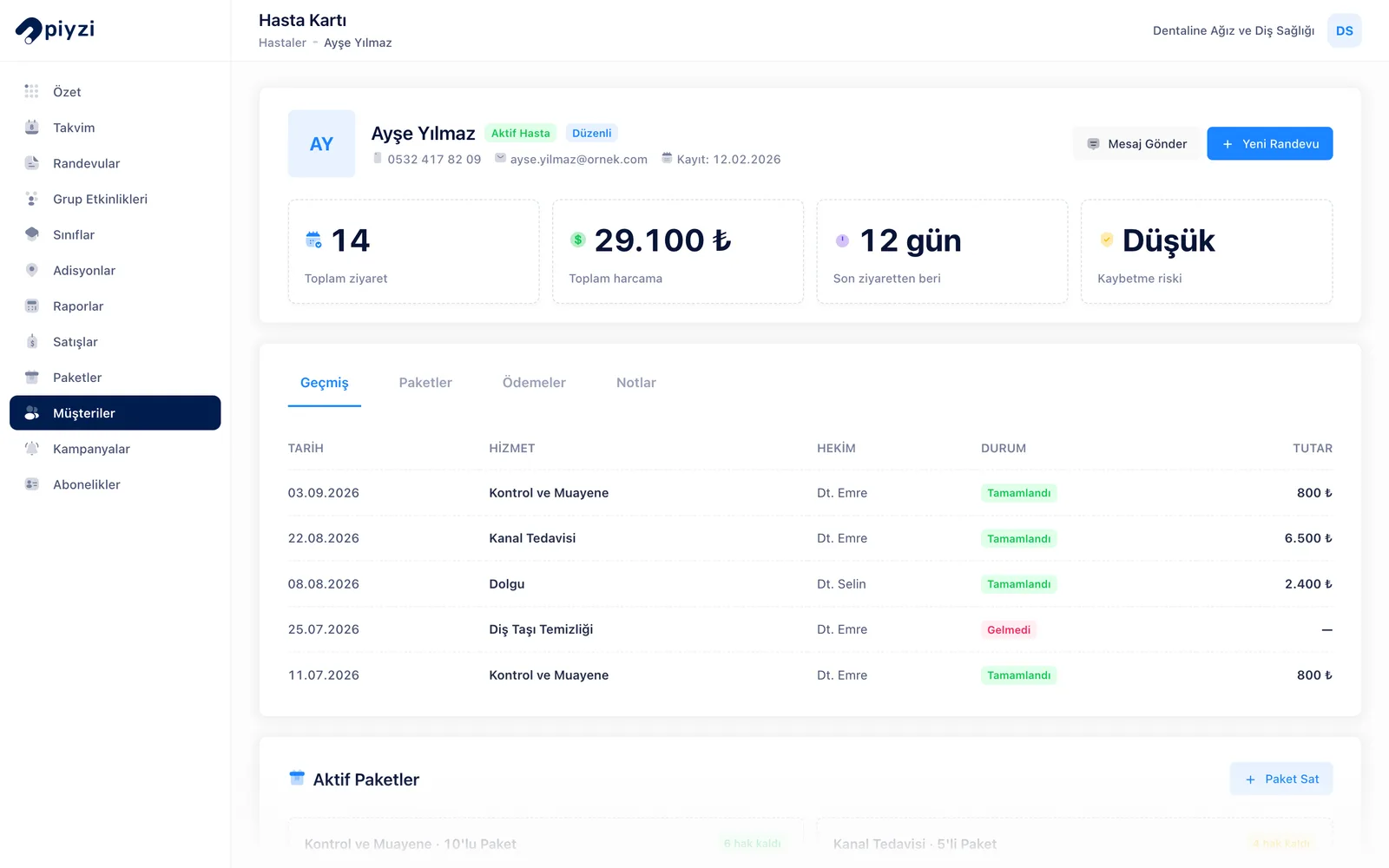
Customer card for a dental clinic in Piyzi: past visits, total spend and active packs
The customer card: history, total spend, visit rhythm and active packs in one place.

Concrete gains for your dental clinic

What changes in the daily work of a clinic that switches to Piyzi:

  • The dates of multi-session treatments and orthodontic check-ups are in the calendar; the series is set up once.
  • The consent form is signed on the patient's phone before treatment; with the mandatory rule on, an unsigned sales card cannot be completed.
  • Installment due dates are in the receivables list; the patient gets a reminder before the due date, and a late payment shows up in the list.
  • The check-up is booked as the patient leaves; a reminder goes out one day before the appointment.
  • A warning appears for a second appointment in an occupied chair or for the same dentist.
  • Revenue per dentist is in the staff report; the month-end salary and commission calculation comes from the same data.
  • Check-ups are booked without a phone call; the patient picks a dentist and a time on your page.

Take your dental practice to the next level with Piyzi

Dentistry is a long-term patient relationship built on trust. Preserving that trust takes a well-run operation alongside good treatment: an appointment at the right time, consent signed before treatment, an installment reminded on time. Piyzi keeps that order for you, so you can focus on treatment.

If you are a solo-dentist practice, it brings appointments, consents and payments into one panel; if you run a multi-dentist clinic, it keeps your team on the same routine with the dentist and chair calendar, role permissions and the staff report. If you have more than one branch, each branch is managed as a separate workspace.

Try Piyzi dentist appointment software free for 14 days. No credit card required, no commitment. Our team imports your patient list free of charge, and we are with you while you set up your dentists, treatment packages and consent forms.

Start today and see the difference this week.

Dental Practice Scheduling Software pricing

Plans start at ₺1,679 per month (VAT included). Every plan includes online booking, WhatsApp and SMS reminders, package tracking and cash reports; there are no hidden fees. Start with a 14-day free trial, no credit card required.

PlanWho it fitsMonthly (VAT incl.)Yearly (VAT incl.)
ProUp to 3 practitioners1,679 ₺15,588 ₺−23%
Pro PlusPopularUp to 5 practitioners2,279 ₺21,588 ₺−21%
MegaUp to 10 practitioners2,988 ₺28,788 ₺−20%

Prices are shown with 20% VAT included and are pulled live from the pricing page; see all plan limits and the full feature comparison on the pricing page. See all plans

Frequently Asked Questions

Everything you need to know

We answered the most common questions from dentists.

Dentist appointment software lets a clinic run its appointments, consents, payments and reminders digitally. Piyzi brings these together in one panel with a dentist and chair calendar, an online booking page, digital consent, treatment packages and installments, the patient card and reminders; your diagnosis and treatment records stay in your clinic's health information management system.

No, it complements it. Piyzi has no dental chart, X-ray viewer, clinical treatment plan module or e-Nabız and MEDULA connection; your diagnosis, treatment and X-ray records stay in your clinic's health information management system. Piyzi runs the appointment, consent, payment and reminder side.

Yes. Each dentist has their own calendar, services and working hours; you define chairs as resources and view the calendar by dentist or by chair. When booking online, the patient chooses a dentist; hours the dentist has blocked do not appear on the page. Online bookings are not assigned a chair; you assign it from the calendar.

You write the check-up appointment into the calendar as the patient leaves. Once you install the appointment reminder from Ready-made Automations, the patient gets a text message, WhatsApp message or app notification one day before the appointment. The ready-made messages go out under your clinic's name and carry only the appointment details; you connect your SMS and WhatsApp accounts from Pi-Store.

Yes. When you sell the treatment package, you split the fee into 1 to 24 installments; installments fall due one month apart and sit in the Receivables list with their due dates. If you install the payment reminder, the patient gets a reminder three days before each due date; an overdue payment shows as overdue in Receivables. Patients see their outstanding payments in the Piyzi app.

Yes. In the Digital Consent Forms module, the 'Dental Treatment Informed Consent Form' comes as a ready template; you review the text with your dentist and approve it. The patient reads the form on their own phone, verifies with a code sent to their registered number and signs; the signed document is stored as a PDF on the patient card. If you make the rule mandatory, the sales card cannot be completed for the treatments you choose until the consent is signed. Code verification requires your clinic's own SMS account to be connected.

Connections to Piyzi are encrypted with SSL, you can turn on two-factor authentication, and you decide who sees which data through role permissions. Which service providers process the data and for what purpose is set out in the KVKK Privacy Notice; as the data controller, informing your patients is your responsibility.

Yes. You can import your patient list from an Excel or CSV file; no messages go to patients during the import, and past appointments are not imported from the file. During setup, our support team imports your list free of charge.

Get Started

Grow your dental clinic with Piyzi

Try it free for 14 days. No credit card required, no commitment.

No credit card required
2-minute setup
No commitment