


The silent backbone of therapy practice is now digital
From the outside, a psychologist's week looks calm; behind the scenes there are many moving parts. Regular weekly clients, new enquiries, online sessions, package tracking, payments and the session notes that follow each client's therapy. Keeping all of this in sync takes as much discipline as the therapy itself. Piyzi's therapist appointment software keeps that order for you.
For many therapists the biggest time drain is scheduling recurring sessions one by one and sending online session links by hand. Small tasks repeated dozens of times a week add up to a real burden. Add payment tracking, outstanding balances and package renewals, and part of the therapist's energy goes into operations. That energy belongs to the client.
In Piyzi you set up a weekly session series once, online sessions you create from the panel get a Google Meet link automatically, session credits in packages are tracked and payments sit in one panel. You focus on the therapy itself.
Why do therapists need specialized software?
General-purpose booking tools cover the basics but miss the core of therapy practice. In therapy you have clients and therapy sessions, not customers and generic appointments. The difference is a real need, not terminology: session notes must stay confidential, weekly sessions need flexible handling, online sessions must run smoothly and you need to notice early when a client starts missing sessions.
The security of notes is the most critical part. Therapy notes contain a person's most private thoughts. Keeping them in Word files, on paper or on a home computer is risky under KVKK (Turkey's data protection law) and under professional ethics. In Piyzi, notes live inside the client card; you decide who can see them through role permissions, and clients never see them anywhere.
Recurring sessions are essential. Most clients come on the same day and time every week. With Piyzi's recurring appointments you set the series up once; it is created up to one year ahead and conflicts are checked. When a client postpones a session, you choose whether the change applies to that session only or to the following ones as well.
Online therapy is part of today's practice too. Once you connect your Google account, online sessions you create from the panel get a Google Meet link automatically, so you no longer copy and send links by hand.
Client tracking and records software for psychologists
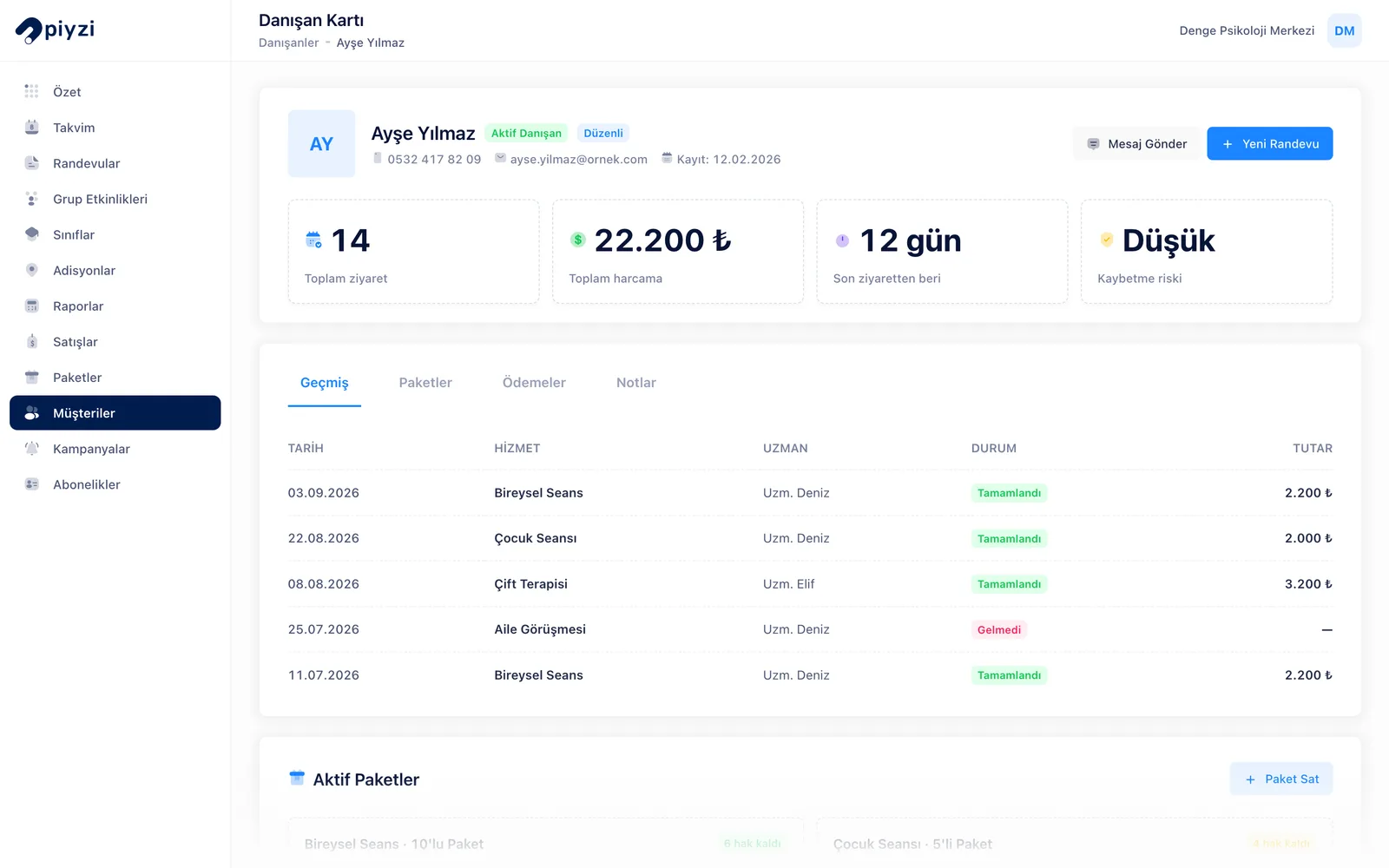
Psychologists looking for client tracking or client records software mainly need one place for everything about a client. In Piyzi that place is the client card:
- Session history and next session: Past and upcoming sessions, including missed and cancelled ones, in one list.
- Session notes: Each note is saved with a topic and date and can be linked to the session it belongs to. Notes are visible only to the team members you authorise; clients never see them on the online booking page, in the app or in the messages they receive.
- Packages and payments: Remaining, used and reserved session credits in the client's package, their payments and any outstanding balance.
- Visit rhythm: Piyzi calculates each client's usual interval between sessions. When the gap grows, the card turns "Late"; when it grows much longer, it turns "At risk". You notice a client drifting away before they drop out.
- Reliability score: A 0–100 score based on no-shows, late cancellations and overdue balances. In your online booking rules you can require your approval for low-scoring clients or stop them from booking online.
- Consent and confidentiality agreement: The Digital Consent Forms module includes a ready-made "Psychological Counselling Information and Confidentiality Agreement" template. You adapt and approve the text; the client signs, the signature can be verified with a code sent to their phone and the signed document is stored as a PDF.
You can import your existing client list from an Excel or CSV file; clients receive no messages during the import.
Core value Piyzi delivers to therapists
The core features that support the daily order of a therapy practice:
- Recurring Appointments: Set up fixed weekly sessions once; the series is created until the end date you choose (up to one year).
- Google Meet Link: Online sessions you create from the panel or the mobile app get a Meet link automatically.
- Client Card and Internal Notes: Session history, packages, payments and notes on one card; role permissions decide who sees the notes.
- Permissions and Account Security: Connections to Piyzi are encrypted with SSL and you can turn on two-factor authentication.
- WhatsApp and SMS Reminders: Set up pre-session reminders with ready-made automations; you connect your SMS and WhatsApp accounts in Pi-Store.
These features work together. When you create an online session, the Meet link is generated; you can add the meeting link as a variable to your "upcoming appointment" reminder so it goes out with the reminder. If you move the session, the link stays the same and the meeting moves to the new time.
Online therapy: how does the Google Meet link work?
- In Pi-Store, connect your Google account from the Google Calendar card.
- When you create an online session from the panel or the mobile app, Piyzi creates an event in your Google Calendar and generates the Meet link. If the client's e-mail address is on file, Google sends them an invitation too.
- You send the link to the client with the SMS notification or through the meeting link variable in your WhatsApp and SMS reminder automations.
- When you move the session, the event moves to the new time and the link stays the same; when you delete it, the event is deleted too.
Two things are worth knowing: the flow is one-way, so events you add to your Google Calendar by hand do not come into Piyzi. Online appointments that clients book themselves on the online booking page do not get a Meet link automatically.
How Piyzi transforms your daily workflow
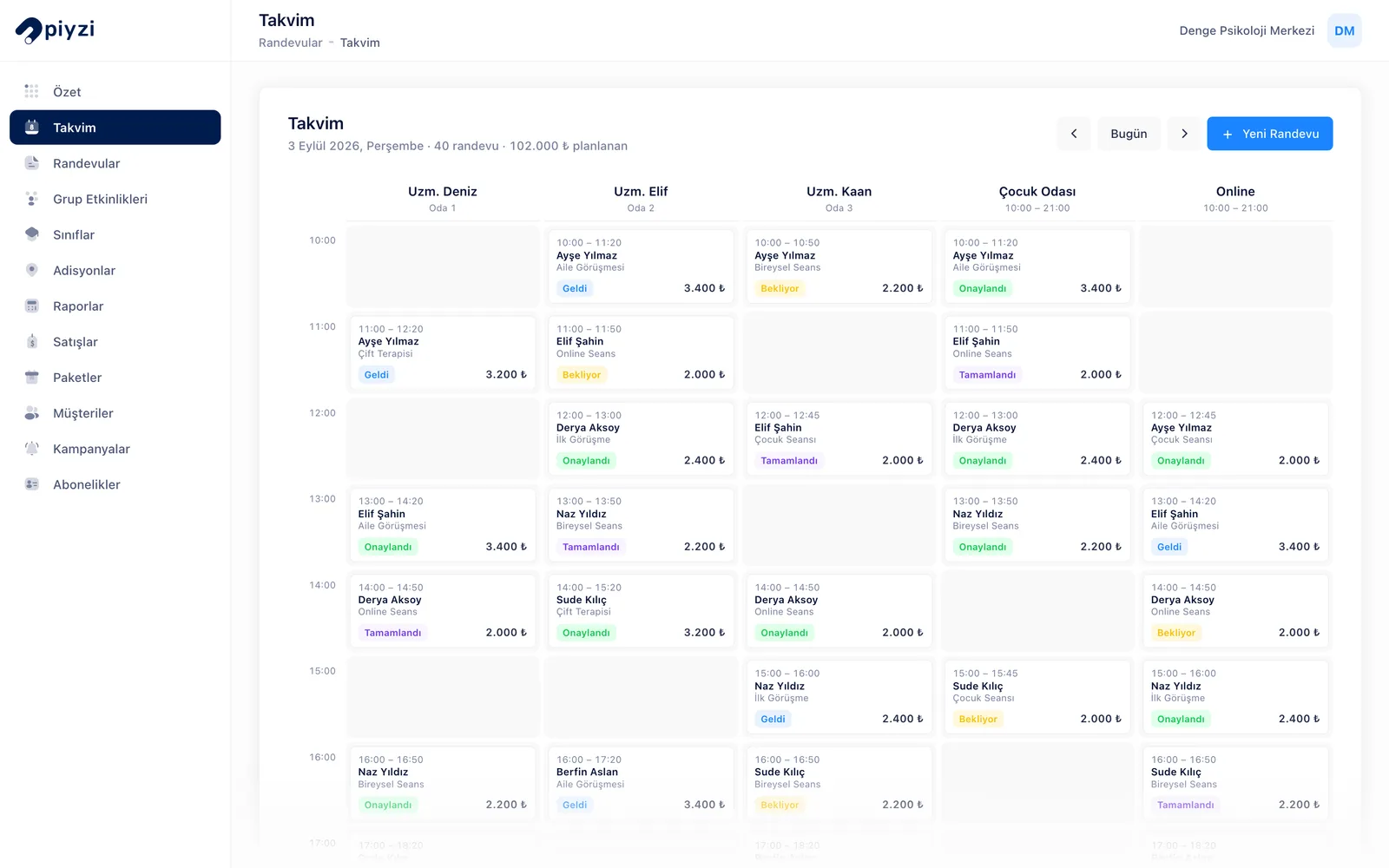
When you open Piyzi in the morning, the calendar shows the day's sessions and which are in person or online; sessions with a Meet link carry a Meet icon. Before the first session you open the client's card and read the note from the previous session. When the session ends you save your note with a topic and date.
The link for the afternoon's online session was created when you set up the session; if you have a reminder automation, it reached the client before the session. At the session time you both click the same link.
At the end of the day the reports show how many sessions took place, how much was collected and which balances are outstanding. In the client list, the visit rhythm badges show who is "Late" or "At risk", so you know whom to call.
KVKK, client privacy, and data security
In therapy, privacy is not only a legal obligation but a core principle of the profession. Piyzi's approach is to describe what it does without overstating it:
- Access: Through role permissions you decide who on your team can see client notes and who can add or edit them. Editing someone else's note is a separate permission.
- Never shown to clients: Notes are never shown to clients on the online booking page, in the Piyzi app or in automated messages.
- Account security: Connections are encrypted with SSL and you can turn on two-factor authentication.
- Consent records: The KVKK consent box is mandatory on the online booking form; consent to commercial messages is asked separately and stored with its date.
- Transparency: Which service providers process the data and for what purpose is set out in the KVKK Privacy Notice.
As the data controller, informing your clients is your responsibility; the "KVKK Privacy Notice Acknowledgement" template in Digital Consent Forms is ready for that.
Concrete gains for your therapy practice
What changes in the day-to-day work of a psychologist who moves to Piyzi:
- Weekly session series are set up once; no rescheduling every week.
- Online session links are no longer created and sent by hand.
- Reminders go out automatically, so fewer sessions are forgotten.
- Clients who start missing sessions are noticed through their visit rhythm before they drop out.
- Package credits, payments and outstanding balances are visible in one panel.
- Notes live on the client's card, protected by permissions, not in scattered files.
- Your online booking page lets new clients book without calling you.
Take your therapy practice to the next level with Piyzi
Therapy requires time, energy and focus for the client; operations should not drain that energy. Piyzi takes over scheduling, reminders, online session links and package tracking, and you focus on the therapy itself.
Clients today expect orderly communication as much as professional therapy: getting reminders, receiving the online session link on time and booking easily. Piyzi gives you that experience ready to use.
If you work alone, it brings order to your practice; if you run a counselling centre, it keeps your team aligned with a shared calendar and role permissions.
You can try Piyzi's therapist appointment software free for 14 days. No credit card required, no commitment. You can set up your first recurring session on the day you open your account.
Start today and see the difference this week.